Once the event kicks off, you can bank your push‑ups daily using:
- the Push for Better app (recommended), or
- the website (after you’ve registered and logged in).
You can bank push‑ups for today or previous days, but not for future days. This helps everyone work towards their daily targets together.
Bank push-ups on the Push for Better app
Click here to get the Push for Better app.
Once you’re logged in:
- Tap the Push-Up tab.
- Tap the + icon at the bottom of the screen, or simply click on the push-up wheel.
- Drag the arrow icon around the wheel until you settle on the number of push‑ups you’ve completed.
- Tap Bank push‑ups to save them.
Remember, you can always bank push‑ups multiple times throughout the day - you don't need to complete them all in one set!
Tip: If you've accidentally banked more push-ups than intended, simply scroll the arrow counter-clockwise to remove push-ups.
Bank push-ups on the website
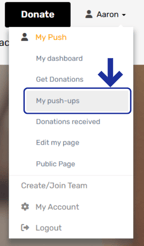
1. Log in to the website and head the drop down menu under your name.
2. Go to 'My push-ups'.
3. Click on 'Edit' for the day you'd like to bank push-ups.
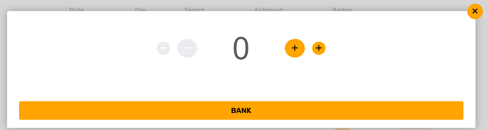
4. Use the '+' buttons to add the number of push-ups you'd like to bank.
5. Click 'Bank'!